Skip to content
B2B ordering for wholesalers on Odoo
One app.Multiple suppliers.
Flota gives your business customers a modern mobile app to order from you — and from their other suppliers on Flota — in one place. Catalogue, prices and stock come straight from your Odoo; orders arrive in Odoo as sales orders.
9:41
Good morning Your suppliers
A Supplier A Fruit & vegetables Tue B Supplier B Dry goods Wed C Supplier C Dairy Fri Ordered often
Tomatoes Box 6 kg + Basmati rice Bag 10 kg + Olive oil Can 5 L +
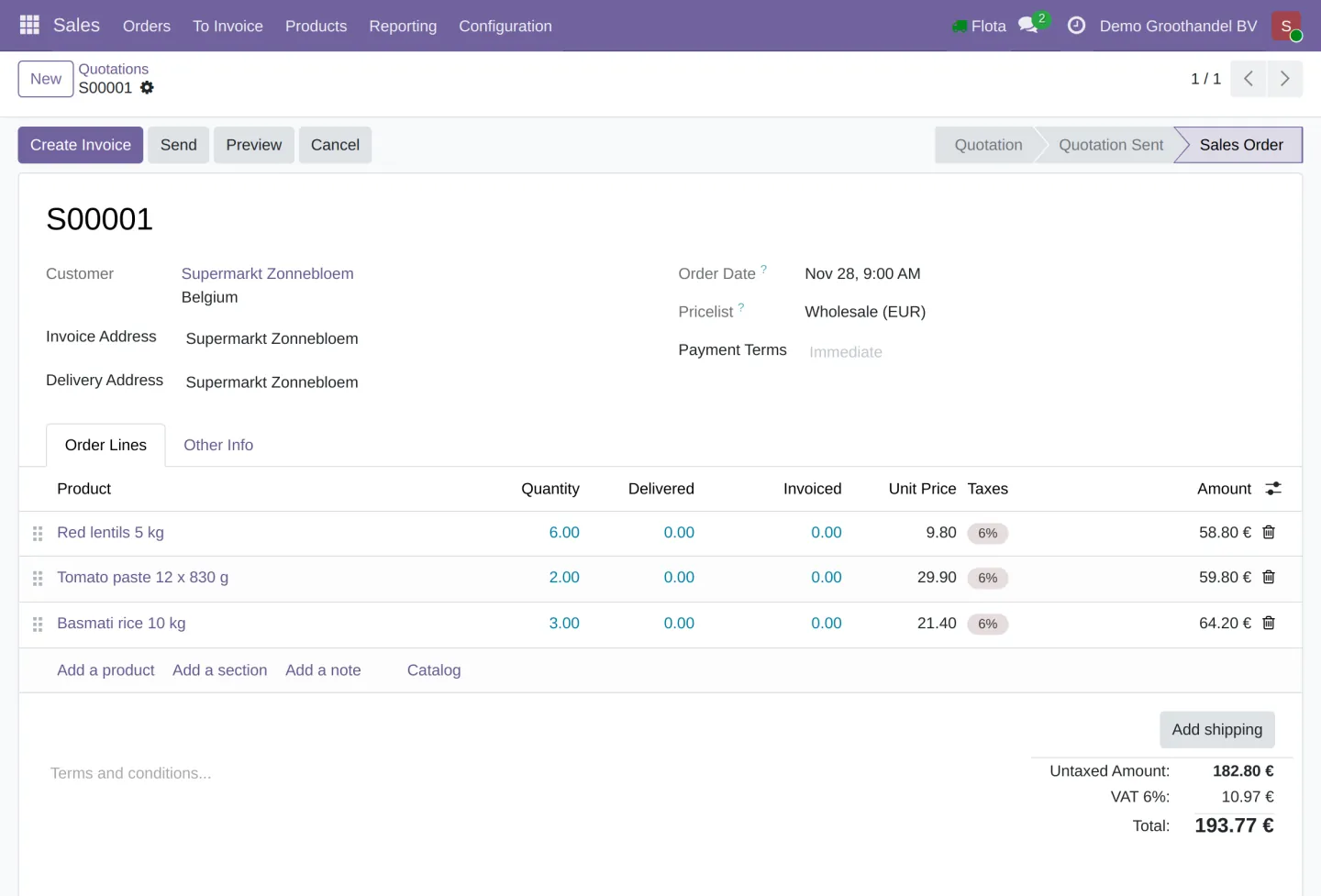
Sales order created Straight into your Odoo Your own prices From your Odoo price list
Built by an official Odoo partner Developed in Belgium Your data stays in your Odoo Made for Odoo 19
Built for both sides of the order Wholesalers get a professional ordering channel without building their own app. Shops and restaurants get one app for all their suppliers.
For suppliers
Your own B2B ordering channel, without an app project
Install the Flota module in Odoo, connect it and invite your business customers. They order on their phone; you process the orders in Odoo as usual.
For buyers
All your suppliers in one app
Shops, restaurants and resellers order from every supplier on Flota with one account — at the prices agreed with each supplier, 24/7.
How it works Getting started takes a few steps on each side.
1 Install the module Add the Flota module to your Odoo. It uses your existing products, price lists, stock and customers.
2 Activate your subscription Connect your Odoo to Flota with a dedicated service account. Your package determines which features are on.
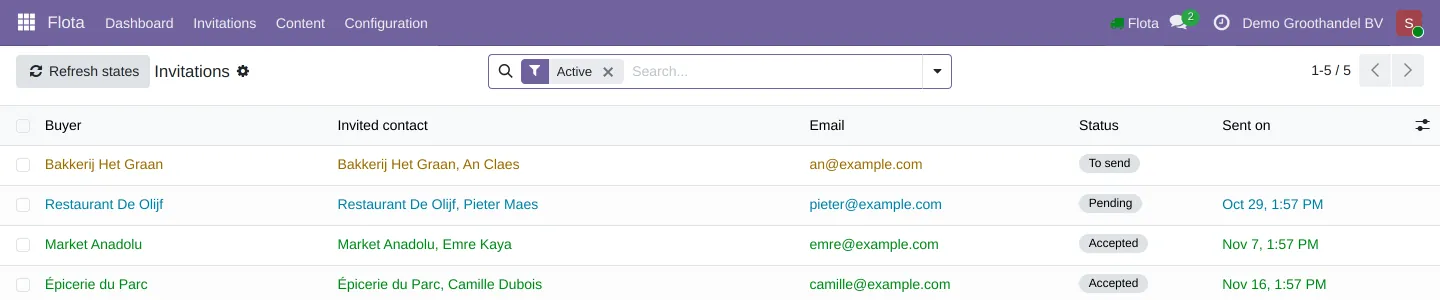
3 Invite your customers Choose the companies you want on Flota. They receive an invitation by e-mail.
4 Receive orders in Odoo Orders placed in the app are created in Odoo as sales orders. Delivery, invoicing and follow-up stay in your usual flow.
1 Get invited Your supplier invites your company to Flota by e-mail.
2 Create your Flota account Download the app and sign up with the same e-mail address the invitation was sent to.
3 Add more suppliers When another supplier on Flota invites you, it is added to the same account.
4 Order and follow up Browse catalogues, order, and check your orders — and, depending on the supplier’s package, invoices and balance.
Everything a B2B order needs Flota works with the data you already maintain in Odoo. No double entry, no separate catalogue.
Catalogue from Odoo Products, categories, variants, images and descriptions in the buyer’s language, straight from Odoo.
Customer-specific prices Each buyer sees the prices from their own Odoo price list.
Available stock Stock comes from your B2B warehouse: on hand minus what is already reserved for other orders.
Cart and ordering Quick ordering in units or packs. The order is created in Odoo as a sales order.
Favourites Shared with the wishlist of your Odoo webshop, so buyers see the same favourites everywhere.
Order history Buyers see their previous orders and can quickly order the same products again.
Promotional banners Highlight offers and new products. Business and Enterprise: multiple banners linked to products and categories.
Invoices and balance Business+ Invoices, PDF documents and the open balance per buyer company.
Notifications Business+ Inform your buyers about offers, new products or delivery news.
Each buyer sees only their own data Orders, invoices and balance belong to the buyer company. One buyer never sees another buyer’s data.
Odoo integration
Your Odoo stays the single source of truth
Flota does not replace your ERP. It adds a mobile ordering channel on top of it.
Odoo module. Installed in your own Odoo, with a management panel for banners, notifications, invitations and settings.Live data. Catalogue, prices, stock and documents are read from Odoo when the buyer needs them.Standard sales orders. No special order flow: confirm, deliver and invoice as you always do.Your customers, your choice. Only companies you invite become buyers. You can see invitations and their status in Odoo.Discover the Odoo integration
odoo Supplier A
odoo Supplier B
odoo Supplier C
An order from the app as a standard sales order, with the customer’s price list and VAT. (example data)
Invitations in Odoo: to send, pending and accepted. (example data)
Packages Choose the package that fits your number of buyers and the features you need. Buyers always use the app for free.
Standard
The shared Flota app with everything needed to order.
Contact us
Most complete
Business
The shared Flota app plus account and communication features.
Contact us
Enterprise
Your own branded app in the App Store and Google Play.
Contact us
Prices on request. The customer limit counts companies with a pending or accepted invitation, not individual users.